Hear the live demo line. Call (571) 556-3587
Property management · Managed phone front desk

It's 2 a.m. A tenant's ceiling is leaking.

Tenant calls do not keep office hours: water through a ceiling at 2 a.m., a lockout on a Sunday, a prospective renter asking about a vacancy while you are showing another unit. Call Kettle is your managed phone front desk: Aria answers in your company's name, takes the tenant's name, number, property address, unit and what is wrong, logs tenant emergencies and alerts your on-call person while the tenant is still on the line. Every call lands in your owner dashboard the same minute.

Hear a sample call: ring the demo line, (571) 556-3587, wait for the menu and press 7 for the sample property management company, then play a tenant to hear how Aria answers and what lands in the owner dashboard. Nothing handles your tenants' calls until you have tested and approved it.

Have a demo code for your business? Call the demo line, press 0 and type the six-digit code our founder gave you: Aria answers as your company, with your hours and services.

You keep your business numberSetup done for youMonth to monthTested before it goes live
Example data
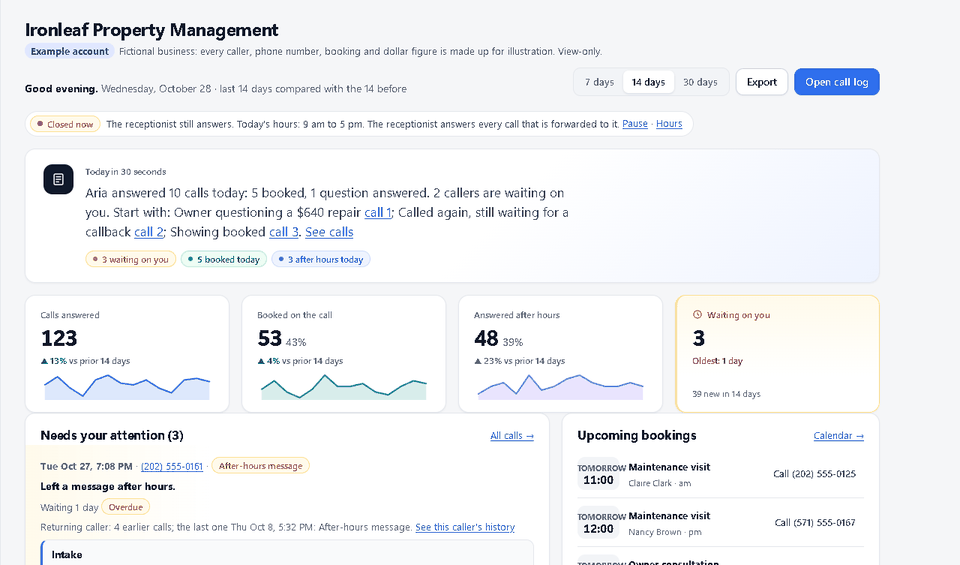
Owner dashboard home screen for a made-up property management company. Example data, a made-up company.

Example account: a made-up property management company. Every caller, number and count is example data.

Hear it

A sample property management call

Sample dashboard - demo data. Invented callers and numbers, shown so you can see the layout. Your real calls appear in your private owner portal.
What changes

What a managed front desk does for property management companies

Plans include 1,000 to 2,000 receptionist minutes a month. 1,000 receptionist minutes is roughly 500 typical 2-minute calls; actual volume depends on call length. Month to month, no setup fee. See plans and the per-minute rate for extra time.

Every call answered, 24/7

Nights, weekends, holidays and while you are at a showing: the phone is answered in your company's name instead of going to voicemail.

Tenant emergencies logged and routed

When a tenant reports water coming in, no heat, a lockout or another emergency you define, Aria logs it with the address and unit and alerts your on-call person while the tenant is still on the line, or rings the on-call phone you choose.

Routine requests on one list

Repair requests, rent questions and messages for your team go on a callback list with the property and unit, flagged until someone marks them handled.

You see every call

Each answered call is in your owner dashboard with a summary, the caller's number and the outcome, and the weekly report shows calls answered, after-hours calls and any request still open.

After hours, for example: It is 2:10 a.m. on a Saturday. A tenant calls: water is coming through the kitchen ceiling from the unit above. Aria answers in your company's name, takes the tenant's name, number, property address, unit and what is happening, logs it as a maintenance emergency and alerts your on-call person while the tenant is still on the line, then rings the on-call phone you choose. A fire, a gas smell or anyone in danger gets the 911 message first. She never promises a repair time you did not give her. Example scenario, not a customer story. Whether a caller books depends on your hours, your rules and the caller.
What your phone shows

Seconds after the call, you know what happened

Seconds after the call, the alert email on your on-call person's phone names the tenant, the number, the property and unit, and what is wrong, so they know what they are walking into before they call back.

Example scenario, not a customer story

A typical property management call, handled

Tenant emergencies at night and calls during showings are answered in your company's name, logged and put in front of your on-call person, instead of sitting in voicemail until the office opens.

  1. 2:10 a.m.Water is coming through a tenant's kitchen ceiling. Your office closed at 6.
  2. 2:10 a.m.Call Kettle answers in your company's name. Aria takes the tenant's name, number, property address, unit and what is happening.
  3. 2:11 a.m.Aria logs it as a maintenance emergency and alerts your on-call person while the tenant is still on the line. The alert on their phone names the tenant, the unit and the problem. A fire or a gas smell would get the 911 message first.
  4. 2:12 a.m.Following your rules, Aria rings the on-call phone you choose, or tells the tenant the on-call person has the details and will call back.
  5. Next morningThe emergency, the summary and every other overnight call are in your owner dashboard, flagged until someone marks them handled.

Where property management calls get missed, and what changes

After-hours maintenance calls

Leaks, no heat and lockouts happen at night. Aria logs the emergency and alerts your on-call person instead of leaving it in a voicemail box until morning.

Calls during showings and inspections

You cannot answer while walking a unit. Aria answers, takes the details, and the request is waiting when you are done.

Prospective renters

A renter asking about a vacancy calls the next listing if nobody picks up. Aria takes their name, number and the property they are asking about so you can call back.

What it handles for property management companies

  • Answers in your company's name with your office hours, the properties you manage and your maintenance rules, from your words
  • Takes the caller's name, a good number, the property address, the unit and what is wrong
  • Logs the tenant emergencies you define (water coming in, no heat, a lockout) and alerts your on-call person while the tenant is on the line, or rings the on-call phone you choose
  • Takes routine repair requests, rent questions and messages for your team as callback requests
  • Takes a prospective renter's name, number and the property they are asking about
  • Tells a caller in danger (fire, gas smell, injury) to call 911, and alerts you
  • Never promises a repair time, a rent amount or an approval you did not give it

A caller can ask for a person at any point.

Try it before you trust it. Call the live demo line, (571) 556-3587, and be the customer. We set it up with you, you call it on a private test line, and nothing handles your customers until you approve it.

How we set you up

We do the work. You make three decisions.

Our target is to have your receptionist built and ready to test about a day after you send your details, and your calls forwarded about two days in. Timing depends on how quickly you send your hours and services and on your phone carrier. These are targets, not a promise. Nothing goes live until you have heard it and approved it.

Day 0: tell us about your business

Book a demo or send your business name, hours, services and call rules through the setup form, about 10 minutes. We reply the same business day.

Day 1: we build and test it

We build the receptionist from your answers and place practice calls against it. You also get a readiness report that shows what we checked. You call a private test line and tell us what to change.

Day 2: you forward your calls

With us on the phone you turn on forwarding from the number your customers already know, and we place a test call together. You can switch it off yourself at any time.

Straight answers

What property managers ask first

Is this a robot my customers will hate?

Callers hear Aria greet them by name, in your business name, like a good front-desk person: short, plain sentences and the questions you picked. No automated-assistant speech at the start of the call. Do not take our word for it. Call the demo line at (571) 556-3587, play an annoyed customer, and try to trip it up.

What if it books something wrong or says something wrong?

It only books inside the hours and services you set, and it only answers from facts you gave us. When it does not know, it takes a message and flags it for you instead of guessing. You test it on a private line first, and nothing takes a real call until you approve it.

What happens with an emergency call?

Urgent words trigger an alert to you while the caller is still on the line, and callers in danger are told to call 911. It is not an emergency service, so you decide in setup who gets the urgent calls and how.

Do I have to change my phone number or buy new equipment?

No. Customers keep dialing the number they know. You forward the calls you choose to us, with us on the phone helping, and you can switch forwarding off yourself at any time. Exactly which forwarding modes work depends on your carrier or phone system, so we confirm yours with a real test call before anything goes live.

What does it cost, and am I locked in?

Plain monthly plans, no setup fee, no cancellation fee, month to month. Setup and onboarding are included. Plans are on the pricing page and in writing before you start.

How much of my time does setup take?

You fill in one form, about 10 minutes: hours, services, the questions customers ask, and the cell number for urgent calls. We build it, you call a private test line, and you approve it before it goes live.

Will I know what it did on my calls?

Yes. Each call it answers shows up in your owner dashboard with a short summary, and bookings and callbacks that need you are flagged. Nothing happens in the dark.

See all questions

Property management questions

What happens when a tenant calls at 2 a.m. with an emergency?

Aria takes the tenant's name, number, property address, unit and what is happening, logs it as an emergency and alerts your on-call person while the tenant is still on the line, or rings the on-call phone you choose. You decide in setup what counts as an emergency. A fire, a gas smell or anyone in danger gets the 911 message first.

Does Aria send a vendor or schedule the repair?

No. Aria logs the request and alerts the person you choose; your team or on-call person decides who goes out and when. Routine repair requests go on a callback list in your owner dashboard that stays flagged until someone marks it handled.

Can Aria answer questions about vacancies and rent?

Only what you give us in your exact wording, such as which units are available or how to apply. Otherwise she takes the caller's name, number and the property they are asking about so your team can call back. She never quotes a rent amount you did not give her.

We manage several properties. Does Aria know which one the tenant means?

She asks. Aria takes the property address and unit on every maintenance call, and you can give us your property list so the details in your dashboard match how you track them.

Can Aria cover only nights and weekends?

Yes. Pick the coverage mode in setup: your phones ring first and Aria answers only when nobody picks up, or only after hours, or every call. You can change the mode or turn forwarding off yourself at any time.

What if the caller just wants to talk to a person?

Yes. A caller can ask for a person at any point, in any wording, and the receptionist rings your phone or the on-call number you chose right then. If nobody answers in about 25 seconds it takes a message and alerts you, so the caller never lands in a loop. It does not hand callers to anyone on our side, so there is no transfer fee: it is your phone or your on-call phone.

Hear a sample call · Book a demo · All questions · Using your existing number · Plans and pricing

See Call Kettle in action.

Book a short demo and we will show it answering calls for a business like yours. Or call the live demo line and talk to it like a customer. Nothing handles your callers until you have tested and approved it.