Hear the live demo line. Call (571) 556-3587
Plumbing · Managed phone front desk

You can't answer the phone from under a sink.

A leaking pipe does not wait for a callback, and that caller dials the next plumber in 30 seconds. Call Kettle is your managed phone front desk: Aria answers in your business name while your hands are wet or the office is closed, finds out where the water is and how fast it is spreading, books the visit or rings your on-call phone, and every call lands in your owner dashboard the same minute.

Or call the demo line, (571) 556-3587, wait for the menu and press 3 for the sample plumber, then play a plumbing customer. Nothing handles your callers until you have tested and approved it. Hear a sample call without dialing.

Have a demo code for your business? Call the demo line, press 0 and type the six-digit code our founder gave you: Aria answers as your company, with your hours and services.

You keep your business numberSetup done for youMonth to monthTested before it goes live
Example data
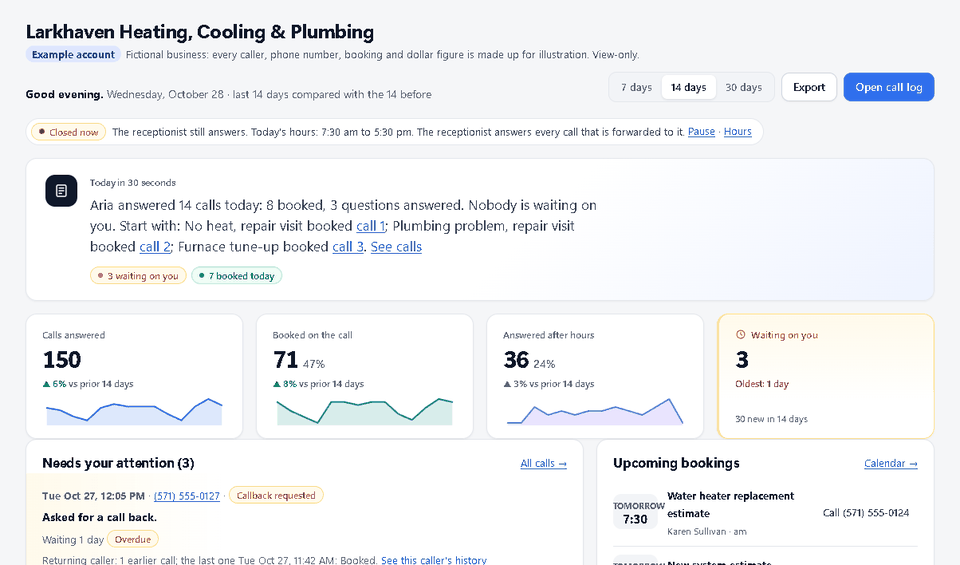
Owner dashboard home screen with example data: a written summary of the day, four counters, a needs-your-attention list with call-back buttons and the upcoming bookings. Example data, a made-up company.

Example data: Larkhaven Heating, Cooling & Plumbing is a made-up company. Your dashboard shows your own calls.

Hear it

A sample plumbing call

Harbor PlumbingTest call
Incoming call
0:00 / 0:00

Press play. The voice and the transcript move together. Call the live demo to hear the current phone voice.

Not a customer recording. HVAC, plumbing and auto repair use saved test-call text; the other trades are scripted examples. Audio is synthetic narration, not the live phone voice.

What changes

What a managed front desk does for plumbing companies

Plans include 1,000 to 2,000 receptionist minutes a month. 1,000 receptionist minutes is roughly 500 typical 2-minute calls; actual volume depends on call length. Month to month, no setup fee. See plans and the per-minute rate for extra time.

Every call answered, 24/7

Under a sink, in a crawlspace, at 2 a.m.: the phone is answered in your business name instead of going to voicemail.

Burst-pipe and flooding calls captured

A caller with water spreading is asked where and how fast, and you get an urgent alert by email while they are still on the line, or your on-call phone rings if you set it that way.

Visits booked inside your hours

Leak, drain and water-heater visits go onto your schedule only in the hours and services you set, with a calendar invite and a job ticket. It says booked only after the booking exists.

You see every call

Each answered call is in your owner dashboard with a transcript and an outcome. Callbacks sit in a needs-attention list until you mark them handled.

After hours, for example: A pipe bursts at 2 a.m. Aria answers in your business name, asks where the water is and how fast it is spreading, takes the address, and sends you the flooding alert. She gives no plumbing instructions of her own. If you set urgent calls to ring your on-call phone, she rings you now; otherwise she books the first slot you allow or takes a callback number. The caller hears a plan instead of a voicemail greeting. Example scenario, not a customer story. Whether a caller books depends on your hours, your rules and the caller.
Example scenario, not a customer story

A typical plumbing call, handled

Leak, drain and water-heater calls that arrive while your hands are wet are answered in your name, written down and booked or put in front of you, instead of going to the next plumber that picks up.

  1. 11:40 a.m.Every plumber is on a job. A customer calls about water spreading under a kitchen cabinet.
  2. 11:40 a.m.Call Kettle answers in your business name. Aria asks the address, where the water is and how fast it is spreading.
  3. 11:41 a.m.A flooding or burst-pipe call sends you an urgent alert while the caller is still on the line, naming who is calling and the kind of problem. A gas smell would get the 911 message first.
  4. 11:42 a.m.Following your rules, Aria books the first slot you allow inside your hours, or rings your on-call phone.
  5. That afternoonThe call, the transcript and the job ticket are in your dashboard, with every other call from the morning beside it.

Where plumbing calls get missed, and what changes

Calls during the job

Hands wet, head under a cabinet, and the next customer reaches voicemail. Aria answers, takes the details, and the job is waiting when you crawl out.

Burst pipe and leak calls

A caller with water spreading will not wait for a callback. Aria answers at any hour, gets the address and how fast it is spreading, and rings your on-call phone or alerts you.

Drain and water heater quotes

Aria books an estimate visit inside your hours instead of guessing a price over the phone, so you quote from the job.

What it handles for plumbing companies

  • Finds out the kind of job (active leak, burst pipe, clogged drain, water heater, sewer line, remodel) and whether water is spreading now
  • Captures the name, address and a good callback number, and checks the address against your service area
  • Books leak, drain and water heater visits inside your hours, with a calendar invite and a job ticket
  • Puts a caller through to your on-call phone when they ask, or when you set burst-pipe and flooding calls to ring you right away
  • Answers hours, service area and common questions from your words
  • Tells callers who describe a gas smell, a fire or an injury to call 911, and alerts you
  • Never quotes a price you did not give it and never gives plumbing instructions

A caller can ask for a person at any point.

Try it before you trust it. Call the live demo line, (571) 556-3587, and be the customer. We set it up with you, you call it on a private test line, and nothing handles your customers until you approve it.

How we set you up

We do the work. You make three decisions.

Our target is to have your receptionist built and ready to test about a day after you send your details, and your calls forwarded about two days in. Timing depends on how quickly you send your hours and services and on your phone carrier. These are targets, not a promise. Nothing goes live until you have heard it and approved it.

Day 0: tell us about your business

Book a demo or send your business name, hours, services and call rules through the setup form, about 10 minutes. We reply the same business day.

Day 1: we build and test it

We build the receptionist from your answers and place practice calls against it. You also get a readiness report that shows what we checked. You call a private test line and tell us what to change.

Day 2: you forward your calls

With us on the phone you turn on forwarding from the number your customers already know, and we place a test call together. You can switch it off yourself at any time.

Straight answers

What plumbing owners ask first

Is this a robot my customers will hate?

Callers hear Aria greet them by name, in your business name, like a good front-desk person: short, plain sentences and the questions you picked. No automated-assistant speech at the start of the call. Do not take our word for it. Call the demo line at (571) 556-3587, play an annoyed customer, and try to trip it up.

What if it books something wrong or says something wrong?

It only books inside the hours and services you set, and it only answers from facts you gave us. When it does not know, it takes a message and flags it for you instead of guessing. You test it on a private line first, and nothing takes a real call until you approve it.

What happens with an emergency call?

Urgent words trigger an alert to you while the caller is still on the line, and callers in danger are told to call 911. It is not an emergency service, so you decide in setup who gets the urgent calls and how.

Do I have to change my phone number or buy new equipment?

No. Customers keep dialing the number they know. You forward the calls you choose to us, with us on the phone helping, and you can switch forwarding off yourself at any time. Exactly which forwarding modes work depends on your carrier or phone system, so we confirm yours with a real test call before anything goes live.

What does it cost, and am I locked in?

Plain monthly plans, no setup fee, no cancellation fee, month to month. Setup and onboarding are included. Plans are on the pricing page and in writing before you start.

How much of my time does setup take?

You fill in one form, about 10 minutes: hours, services, the questions customers ask, and the cell number for urgent calls. We build it, you call a private test line, and you approve it before it goes live.

Will I know what it did on my calls?

Yes. Each call it answers shows up in your owner dashboard with a short summary, and bookings and callbacks that need you are flagged. Nothing happens in the dark.

See all questions

Plumbing questions

What if it is a real plumbing emergency?

You decide: book the soonest slot and alert you, or ring your on-call phone. A burst pipe or flooding call sends you an urgent alert while the caller is still on the line. A gas smell always gets the 911 message first. It is not an emergency service and never promises an arrival it has not booked.

Will it give quotes?

No. It does not invent prices. If you give us exact wording for a trip charge or a flat-rate service, Aria says that; otherwise she books an estimate visit or takes the details so you can quote properly.

Can it get a plumber out at 2 a.m.?

If that is your rule. In setup you choose what urgent after-hours calls do: ring your on-call phone right then, or take the address and what is wrong and alert you. Aria collects where the water is, how fast it is spreading and a callback number, and leaves the dispatch decision to you.

A cold snap brings a wave of frozen-pipe calls. Will it keep up, and what does that do to my minutes?

It is not a hold queue: every caller who reaches the front desk is answered and handled, and each one lands in your dashboard with the address, the problem and a callback number, so you can work the list in the order you choose. Every call it answers counts against your included receptionist minutes; calls that only rang your phone and rejected calls do not. You are emailed as you approach your included minutes and again when you reach them, and extra time is billed at the per-minute rate printed on your plan and put in writing before you start, with no penalty rate. If you run over two months in a row, the next plan up is usually the cheaper answer, and your weekly report shows the minutes so you can see it coming.

Can it book straight into my scheduling or dispatch software?

Not directly. Direct connections to field-service or job-management software are not offered today. Bookings are made inside the hours and services you set, you get a calendar invite and an emailed job ticket with name, number, address, issue and urgency, and every call can be exported as CSV or sent to a signed webhook. Calendly and Cal.com booking are included on the plans that list them. Google Calendar is read-only busy-time checking today, so the receptionist can avoid your busy slots but does not write to it.

What if the caller just wants to talk to a person?

Yes. A caller can ask for a person at any point, in any wording, and the receptionist rings your phone or the on-call number you chose right then. If nobody answers in about 25 seconds it takes a message and alerts you, so the caller never lands in a loop. It does not hand callers to anyone on our side, so there is no transfer fee: it is your phone or your on-call phone.

Hear a sample call · Book a demo · All questions · Using your existing number · Plans and pricing

See Call Kettle in action.

Book a short demo and we will show it answering calls for a business like yours. Or call the live demo line and talk to it like a customer. Nothing handles your callers until you have tested and approved it.