Hear the live demo line. Call (571) 556-3587
Home services and contractors · Managed phone front desk

You're on the job site. A new project is calling.

General contractors and other trades live on estimates and referrals, and a new project goes to whoever answers first. Call Kettle is your managed phone front desk: Aria answers in your business name when you are on site or the office is closed, finds out what the caller wants done and where, and books an estimate visit inside your hours or alerts you. Every call lands in your owner dashboard the same minute.

Or call the demo line, (571) 556-3587, wait for the menu and press 1 for the sample heating and air company, the closest home-service example, then play a home services and contractors customer. Nothing handles your callers until you have tested and approved it. Hear a sample call without dialing.

Have a demo code for your business? Call the demo line, press 0 and type the six-digit code our founder gave you: Aria answers as your company, with your hours and services.

You keep your business numberSetup done for youMonth to monthTested before it goes live
Example data
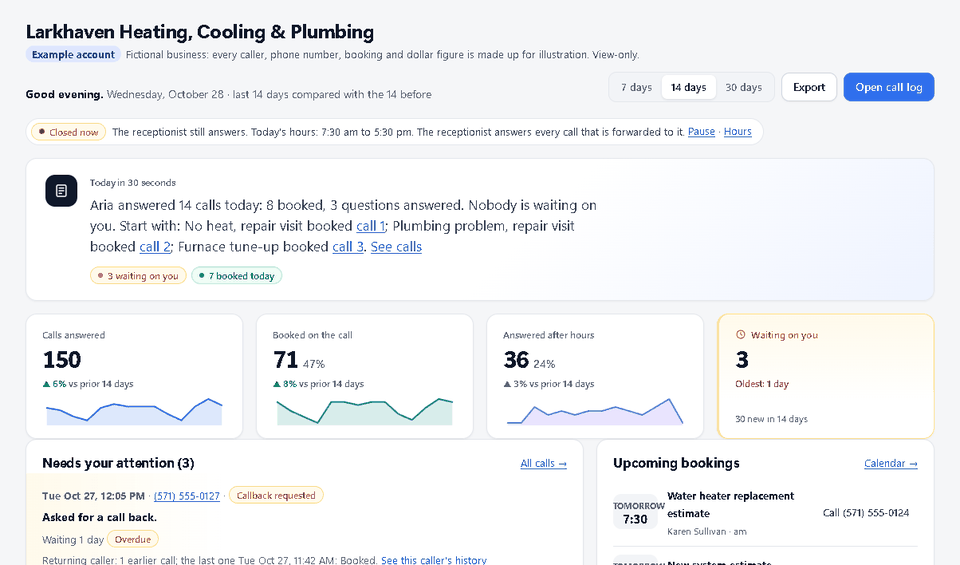
Owner dashboard home screen with example data: a written summary of the day, four counters, a needs-your-attention list with call-back buttons and the upcoming bookings. Example data, a made-up company.

Example data: Larkhaven Heating, Cooling & Plumbing is a made-up company. Your dashboard shows your own calls.

Hear it

A sample home services and contractors call

Cornerstone RemodelingTest call
Incoming call
0:00 / 0:00

Press play. The voice and the transcript move together. Call the live demo to hear the current phone voice.

Not a customer recording. HVAC, plumbing and auto repair use saved test-call text; the other trades are scripted examples. Audio is synthetic narration, not the live phone voice.

What changes

What a managed front desk does for home services and contractors companies

Plans include 1,000 to 2,000 receptionist minutes a month. 1,000 receptionist minutes is roughly 500 typical 2-minute calls; actual volume depends on call length. Month to month, no setup fee. See plans and the per-minute rate for extra time.

Every call answered, 24/7

On a job site, in a client meeting, or after hours: the phone is answered in your business name instead of going to voicemail.

New projects captured on the first call

Aria asks a homeowner describing a roof, a remodel or a yard what they want done, where and when, plus a callback number, so the estimate request is yours instead of the next company's.

Estimate visits booked inside your hours

Site visits go onto your schedule only in the hours and services you set, with a calendar invite and a job ticket. It says booked only after the booking exists.

You see every call

Each answered call is in your owner dashboard with a transcript and an outcome. Callbacks sit in a needs-attention list until you mark them handled.

After hours, for example: A homeowner who has been researching a kitchen remodel calls at 8 p.m. Your office closed at 5. Aria answers in your business name, asks what they want done, the address and a good time to visit, takes a callback number, and books an estimate visit inside the hours you set or takes a callback request and alerts you. The caller hears a plan instead of a voicemail greeting, and you read the job ticket in the morning. Example scenario, not a customer story. Whether a caller books depends on your hours, your rules and the caller.
Example scenario, not a customer story

A typical home services and contractors call, handled

New projects are captured in your name on the first call and booked or put in front of you, so the estimate goes to you and not to whoever picked up first.

  1. 10:30 a.m.You are on a job site with a saw running. A homeowner calls about a kitchen remodel.
  2. 10:30 a.m.Call Kettle answers in your business name. Aria asks what they want done, the address and a good time to visit.
  3. 10:31 a.m.She takes a callback number and checks the address against the service area you gave us.
  4. 10:33 a.m.Following your rules, Aria books an estimate visit inside the hours you set, or takes a callback request and alerts you.
  5. That eveningThe call, the transcript and the job ticket are in your dashboard, and you quote from the site instead of chasing a missed call.

Where home services and contractors calls get missed, and what changes

Estimate and project requests

A homeowner describing a remodel or a roof is captured by Aria on the first call, with the address, what they want done and a good time to visit.

Calls while you are on site

Hands full, saw running, or in a meeting with a client: Aria answers instead of voicemail, and the lead is waiting when you are done.

After-hours and weekend inquiries

People research projects in the evening. Aria answers, takes the details or books a visit, and you read it in the morning.

What it handles for home services and contractors companies

  • Finds out the kind of project (remodel, roof, addition, landscaping, repair, cleaning or another you offer) and when the caller wants it done
  • Captures the name, address and a good callback number, and checks the address against your service area
  • Books estimate visits and site visits inside your hours, with a calendar invite and a job ticket
  • Puts a caller through to your phone when they ask, or when you set certain calls to ring you
  • Answers service area and hours from your words
  • Tells callers who describe a fire or an injury to call 911, and alerts you
  • Never gives a price, a quote or a timeline you did not give it

A caller can ask for a person at any point.

Try it before you trust it. Call the live demo line, (571) 556-3587, and be the customer. We set it up with you, you call it on a private test line, and nothing handles your customers until you approve it.

Other trades

If you book appointments, estimates or site visits, it fits

The setup is built around your services, hours and questions, so the same receptionist works across appointment-based trades. We write the intake questions for your kind of work with you.

  • Roofing
  • Remodeling and renovation
  • Landscaping and lawn care
  • House cleaning
  • Painting
  • Flooring
  • Fencing and decks
  • Auto repair
How we set you up

We do the work. You make three decisions.

Our target is to have your receptionist built and ready to test about a day after you send your details, and your calls forwarded about two days in. Timing depends on how quickly you send your hours and services and on your phone carrier. These are targets, not a promise. Nothing goes live until you have heard it and approved it.

Day 0: tell us about your business

Book a demo or send your business name, hours, services and call rules through the setup form, about 10 minutes. We reply the same business day.

Day 1: we build and test it

We build the receptionist from your answers and place practice calls against it. You also get a readiness report that shows what we checked. You call a private test line and tell us what to change.

Day 2: you forward your calls

With us on the phone you turn on forwarding from the number your customers already know, and we place a test call together. You can switch it off yourself at any time.

Straight answers

What home services and contractors owners ask first

Is this a robot my customers will hate?

Callers hear Aria greet them by name, in your business name, like a good front-desk person: short, plain sentences and the questions you picked. No automated-assistant speech at the start of the call. Do not take our word for it. Call the demo line at (571) 556-3587, play an annoyed customer, and try to trip it up.

What if it books something wrong or says something wrong?

It only books inside the hours and services you set, and it only answers from facts you gave us. When it does not know, it takes a message and flags it for you instead of guessing. You test it on a private line first, and nothing takes a real call until you approve it.

What happens with an emergency call?

Urgent words trigger an alert to you while the caller is still on the line, and callers in danger are told to call 911. It is not an emergency service, so you decide in setup who gets the urgent calls and how.

Do I have to change my phone number or buy new equipment?

No. Customers keep dialing the number they know. You forward the calls you choose to us, with us on the phone helping, and you can switch forwarding off yourself at any time. Exactly which forwarding modes work depends on your carrier or phone system, so we confirm yours with a real test call before anything goes live.

What does it cost, and am I locked in?

Plain monthly plans, no setup fee, no cancellation fee, month to month. Setup and onboarding are included. Plans are on the pricing page and in writing before you start.

How much of my time does setup take?

You fill in one form, about 10 minutes: hours, services, the questions customers ask, and the cell number for urgent calls. We build it, you call a private test line, and you approve it before it goes live.

Will I know what it did on my calls?

Yes. Each call it answers shows up in your owner dashboard with a short summary, and bookings and callbacks that need you are flagged. Nothing happens in the dark.

See all questions

Home services and contractors questions

Does it work for roofing, landscaping, cleaning or auto repair?

Yes. The setup is built around your services, hours and questions, so the same front desk works for any appointment-based trade, and Aria asks the intake questions written for your kind of work. The call player on the home page has spoken examples for roofing, landscaping, cleaning, auto repair and general contractors.

Can it give a quote for a project?

No. It does not invent prices. If you give us exact wording, such as a consultation fee or a minimum job size, Aria says that; otherwise she captures the project details and books an estimate visit, or takes a message so you can quote properly.

Will it replace my office staff?

No. Your team stays primary. It covers calls nobody can get to: while you are on site, after hours and during busy periods, and every one of those calls is in your dashboard with the rest.

Most of my calls are estimate requests. Will it waste my minutes on tire-kickers?

It asks the intake questions you set, such as the kind of work, the address and whether the home is in your service area, so a caller outside your area or asking for work you do not do is told that politely and takes little time. Every call it answers counts against your included receptionist minutes; calls that only rang your phone and rejected calls do not. You are emailed as you approach your included minutes and again when you reach them, and extra time is billed at the per-minute rate printed on your plan and put in writing before you start, with no penalty rate. If you run over two months in a row, the next plan up is usually the cheaper answer, and your weekly report shows the minutes so you can see it coming.

Can it book straight into my scheduling software?

Not directly. Direct connections to field-service or job-management software are not offered today. Bookings are made inside the hours and services you set, you get a calendar invite and an emailed job ticket with name, number, address, issue and urgency, and every call can be exported as CSV or sent to a signed webhook. Calendly and Cal.com booking are included on the plans that list them. Google Calendar is read-only busy-time checking today, so the receptionist can avoid your busy slots but does not write to it.

What if the caller just wants to talk to a person?

Yes. A caller can ask for a person at any point, in any wording, and the receptionist rings your phone or the on-call number you chose right then. If nobody answers in about 25 seconds it takes a message and alerts you, so the caller never lands in a loop. It does not hand callers to anyone on our side, so there is no transfer fee: it is your phone or your on-call phone.

Hear a sample call · Book a demo · All questions · Using your existing number · Plans and pricing

See Call Kettle in action.

Book a short demo and we will show it answering calls for a business like yours. Or call the live demo line and talk to it like a customer. Nothing handles your callers until you have tested and approved it.